Creating a PayDo business account is the first step. It lets you access a basic set of financial tools to streamline your business. To get all the features of your PayDo account, you must complete business account verification. This verification ensures that your business meets all necessary requirements.
Here’s the entire process of PayDo Business Account verification. The steps below offer all the information you need to go through the process without any hiccups.
Step 1. Account Creation and Setup
Create a Business Account. Start by visiting the PayDo Registration Page. Enter your email and create a secure password.
Activate Your Account. Confirm your email by clicking on the activation link sent to your inbox.
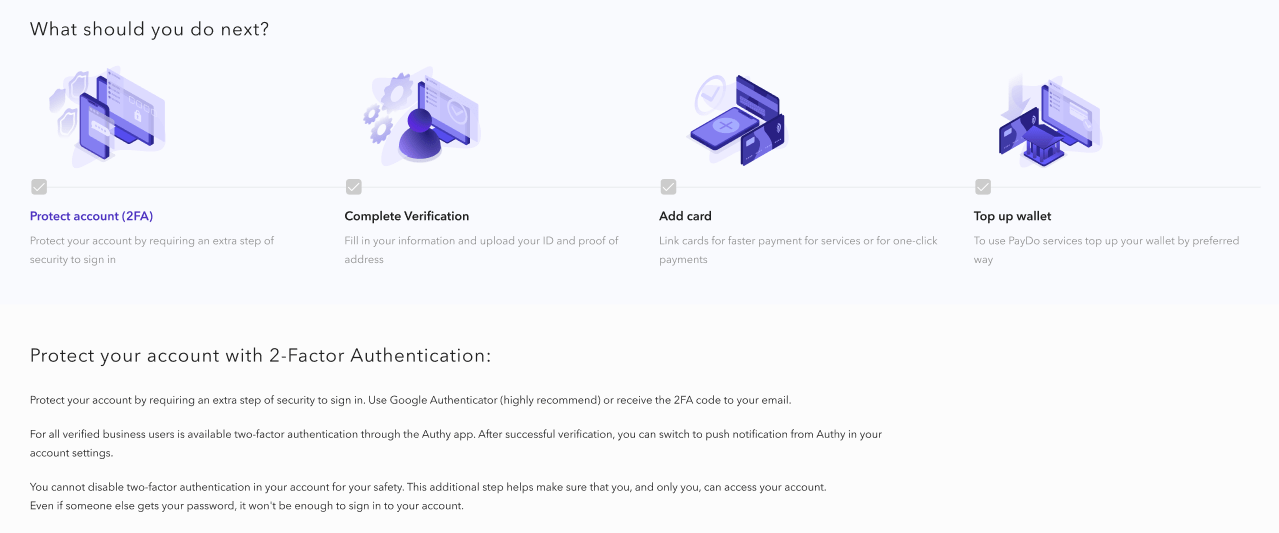
Enable Two-Factor Authentication (2FA). For added security, switch to Google Authenticator for 2FA. This step is crucial before proceeding with verification.
Step 2. Business Account Verification Process
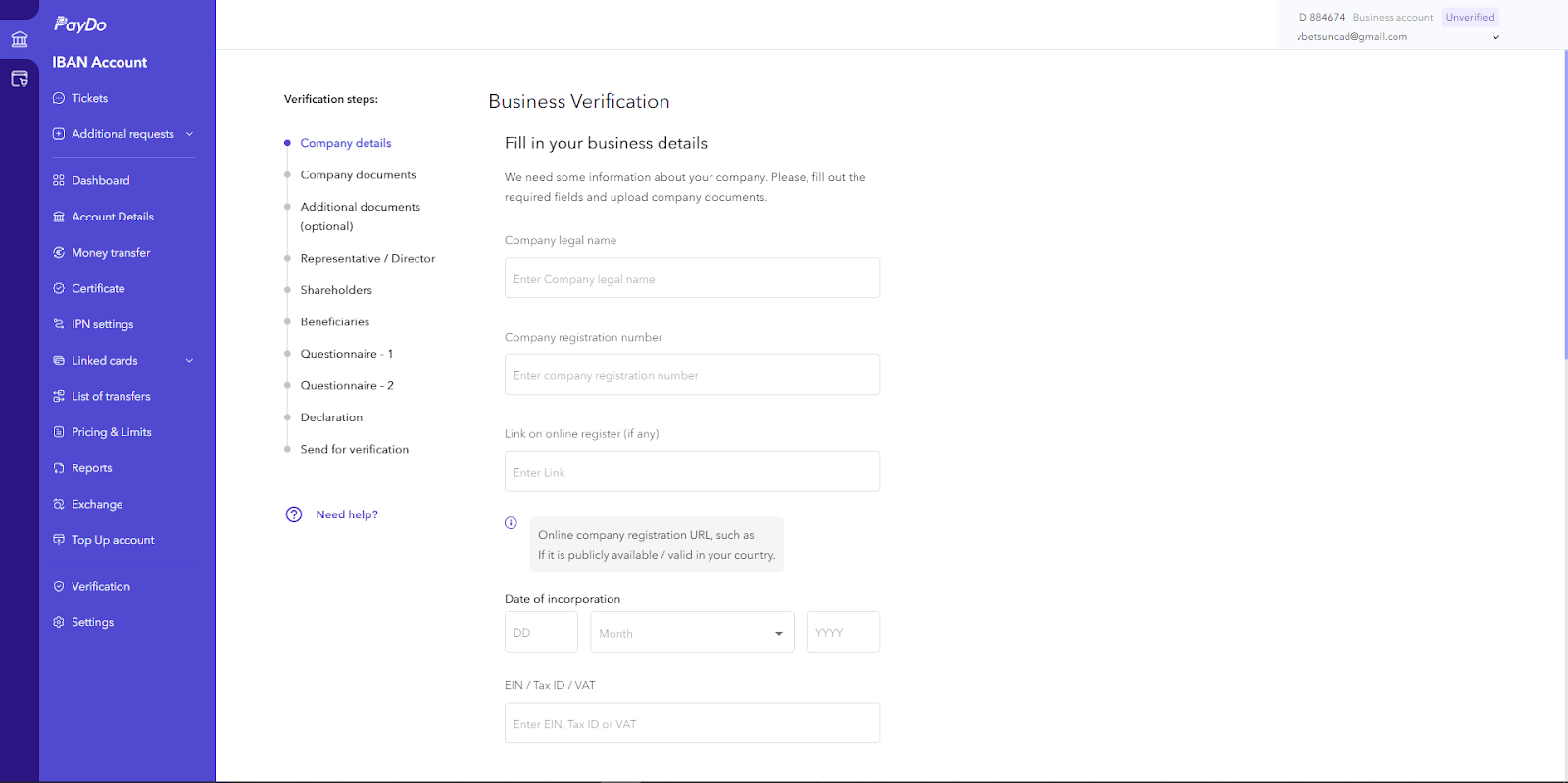
After setting up your 2FA, go through these components to complete the business account verification process:
I. Company Details
You need to provide various business account verification details, including:
Company Legal Name. The official name of your business as registered with government authorities.
Company Registration Number. The unique number assigned to your business upon registration.
Link to Online Register (if any). URL to your business’s online registration record, if available.
Date of Incorporation. The date your business was officially registered.
EIN/Tax ID/VAT. Your business’s tax identification number.
Company Activity. Describe the types of goods or services your company provides.
Registered Address. The official address used for business registration.
II. Company Documents
Upload the following documents for business account verification:
Certificate of Incorporation. Official document proving the formation of your company.
Proof of Company Ownership. Documents such as share certificates, ownership charts, or declarations of trust.
Bank Account Statement. A recent statement from your business bank account (last 3-6 months).
Previous Processing History (Optional). Upload transaction history if available.
III. Additional Documents (Optional)
You may upload up to 20 additional documents, such as:
Corporate Chart. Detailed structure of your company.
Good Standing Certificate. Proof that your business complies with local regulations.
IV. Shareholders
Submit information for up to 10 individual shareholders or up to 5 company-owners. This process ensures that PayDo has accurate details on the individuals or entities that have ownership stakes in your company. This is instrumental for business account verification.
Required Information
Full Legal Name. Enter the shareholder’s full legal first name and last name as it appears on their identification document.
Date of Birth. Provide the shareholder’s date of birth.
Address. Enter the residential address of the shareholder.
Citizenship. Select the country of citizenship for the shareholder.
Identification Document. Upload one of the following identification documents:
Passport. Photo or scan of the passport page with the picture.
Identity Card. Photo or scan of the identity card.
Residence Permit. Photo or scan of the residence permit.
Driver’s License. Photo or scan of the driver’s license.
Proof of Address
Upload Proof of Address. This can include a bank statement, utility bill (gas, electricity, water), tax return, or council bill not older than 3 months.
Additional Documentation
Bank Statement. Upload the front side of the bank statement showing the shareholder’s name and account details.
Company Ownership Document. If applicable, provide documentation that shows proof of ownership in the company, such as share certificates.
By providing this information, PayDo ensures compliance with regulatory standards and maintains accurate company ownership records. Make sure to upload clear and legible copies of all documents to avoid any delays in the business account verification process.
V. Beneficiaries (UBOs):
In this section, you will need to provide detailed information about the Ultimate Beneficial Owners (UBOs) of your company. UBOs are individuals who own or control the company, either directly or indirectly.
When providing information on UBOs, you will be asked to present these documents as a part of business account verification:
Citizenship and Shareholding
Citizenship. Select the country of citizenship for each UBO.
Percentage of Shares. Indicate the percentage of shares owned by each UBO.
Personal Information
Full Legal Name. Enter the UBO’s full legal first name and last name as it appears on their official identification document.
Date of Birth. Provide the date of birth of the UBO.
Address. Enter the residential address of the UBO, including province/district/county, city, and street address.
Identification Documents
Upload one of the following identification documents for each UBO:
Passport. A clear photo or scan of the passport page with the picture.
Identity Card. A clear photo or scan of the identity card.
Residence Permit. A clear photo or scan of the residence permit.
Driver’s License. A clear photo or scan of the driver’s license.
Proof of Address
Provide a proof of address document that is not older than three months. Accepted documents include:
Bank Statement
Utility Bill
Tax Return
Council Bill
Additional Documentation (if applicable):
CV or Social Network Profile. Upload a photo or scan of the UBO’s CV or provide a link to their social network profile.
Company Website and Social Media Profiles. Links or uploads as separate files.
Uploading and Verification:
Upload Documents. Ensure that all documents are clear, well-lit, and show all corners of the document. PDF, JPG, and PNG formats are accepted with a maximum file size of 5 MB.
Review and Submit. Before submitting, review all the uploaded documents and entered data carefully. PayDo emphasizes the importance of accuracy, as errors can delay the verification process.
Note:
You can submit information for up to 10 beneficiaries (UBOs) in one company.
Extra verification fees may apply for complex company structures or multiple layers of ownership.
By providing comprehensive and accurate information about your UBOs, you help ensure that PayDo complies with regulatory standards and maintains the integrity of its financial ecosystem. This step is crucial in protecting your business and building trust with financial institutions and partners.
VI. Questionnaire 1
The first questionnaire in the PayDo business account verification process addresses key regulatory and operational aspects of your company. It includes the following questions:
Business Activities
This section asks about the nature of your company’s operations. You need to specify if your business is involved in financial services, payment services, gambling, betting, cryptocurrency, foreign exchange (forex), or similar activities. Additionally, indicate if your company acts as a payment agent, accepting money on behalf of these activities.
Licensing
Here, you need to disclose whether your company’s activities require any form of licensing or legal opinion in your or your clients’ jurisdictions. This ensures that your business complies with local laws and regulations pertinent to your operations.
Income Source
This section requires information on whether more than 20% of your company’s income comes from companies engaged in financial services, payment services, gambling, betting, cryptocurrency, forex, or similar activities. It helps to determine the primary sources of your business’s revenue.
AML/CTF Policies
You need to confirm if your company is subject to Anti-Money Laundering (AML) and Counter-Terrorist Financing (CTF) rules. Additionally, you should indicate if your company has documented and implemented policies to counter money laundering and terrorist financing.
Corporate Payments
This section asks if it is common for your company to accept payments from corporate entities. This information helps to understand your business’s transaction patterns and client base.
Individual Payments
Similar to corporate payments, this section inquires if it is common for your company to accept payments from individual customers. This helps to provide a complete picture of your payment acceptance practices.
Politically Exposed Persons (PEP)
You need to disclose whether any of your company’s beneficiaries, shareholders, directors, immediate family members, or close business associates are currently or have formerly been classified as Politically Exposed Persons (PEPs). PEPs are individuals who hold or have held prominent public positions, which may pose higher risks due to the potential for involvement in corruption. This information is crucial for risk assessment and compliance purposes.
These questions help PayDo understand your company’s regulatory obligations, risk exposure, and the nature of your business activities, ensuring compliance with legal and financial standards.
VII. Questionnaire 2
The second questionnairefocuses on gathering comprehensive details about the business and its critical operations. Here are the specific types of information required:
Products, Services, and Funds Flow
Detailed description of the business’s products, services, and how funds flow.
Financial Accounts
Information on whether the business holds financial accounts in other financial institutions.
Proof of Business Nature
Reference letters or agreements with clients that validate the nature of the business. This includes documents that clearly understand the business activities and relationships.
Key Suppliers
Details about the primary suppliers to whom the business makes payments. This includes the supplier’s name, country, industry, and any relevant website or social media links.
Key Customers
Information on critical customers from whom the business receives money. This includes the customer’s name, country, industry, and any relevant website or social media links.
Countries of Operations
List of countries where the business operates, including incoming and outgoing transfers, with the percentage of operations in each country.
Second Part
Estimated Turnover
Estimated monthly and annual turnover for the first year of operations.
UBO’s CV or Social Network Profile
Upload a CV or provide links to social network profiles for the Ultimate Beneficial Owner (UBO). This should include details about the UBO’s background and qualifications.
Company Website and Social Media Profiles
Links to the company’s website, LinkedIn, Facebook, and other relevant social media profiles, or an uploaded company profile.
Licensed or Legal Opinions
Information on whether the company holds any licensed or legal opinions.
UBO Source of Funds
Description of the source of funds for the UBO. This includes the origin of the funds and supporting documents, if available.
UBO Source of Wealth
Description of the UBO’s entire body of wealth, including business ownership, employment, inheritance, and investments. Supporting documents should be uploaded if available.
Funds Flow Description/Chart
A detailed description or chart illustrating how funds flow within the business.
Company Head Office/Operational Address
The address details of the company’s head office or operational address differ greatly from those of the registered address.
This questionnaire ensures that the business account verification process covers all aspects of the company’s operations, relationships, and financial standing to meet regulatory and compliance requirements.
VIII. Declaration
In the declaration step of the business verification process, you must agree to notify Ecommerce Technologies LTD promptly if any changes occur in critical areas of your business. This agreement ensures that PayDo maintains accurate and up-to-date information about your company, which is essential for regulatory compliance and the smooth operation of your account. The areas where changes must be reported include:
Company Information
Name. Notify us of any changes to the legal name of your business.
Registered Number. Inform about changes to the company’s registration number.
Registered Office. Update any modifications to the official registered address.
Principal Place of Business. Report changes to the central location of your business operations.
Management and Ownership
Board of Directors. Notify us of board members or equivalent management body changes.
Senior Persons Responsible for Operations. Inform about new or departing senior management personnel.
Legal Owners. Report changes in the legal ownership of the company.
Beneficial Owners. Update any modifications to the individuals who ultimately own or control the business.
Legal Compliance
Law to Which You Are Subject: Notify us of any changes to your business’s legal jurisdiction or regulatory framework.
Articles of Association or Governing Documents: Report changes to the fundamental governing documents of your company, such as articles of association or bylaws.
By agreeing to these terms, you confirm that you understand and accept the responsibility to keep the company informed of any significant changes. This proactive communication helps ensure your business complies with all relevant regulations and maintains a trustworthy relationship with financial institutions and partners.
To proceed, check the “I agree” box and click “Next.” This action confirms your understanding and acceptance of the requirement to keep your business information current throughout your business relationship with PayDo.
IX. Send for Verification
The final step in the business verification process is to send your application and all related documents for verification. Here’s what you need to do:
Review Your Information
Carefully check all the uploaded data and documents. Ensure that every piece of information is accurate and complete.
This review is crucial because you won’t have a second chance to request re-verification.
Submit for Verification
Once you know everything is correct, click the “Send for Verification” button.
By clicking this button, you confirm that all the provided information and documents meet the requirements.
Await Confirmation
If the documents meet the requirements, they will be accepted, and you will receive an email notification.
If everything is in order, your verification process will move forward.
This final submission ensures that your business verification is processed correctly, allowing your business to comply with all regulatory and compliance standards.
Conclusion
Creating a PayDo business account is the first step towards accessing a comprehensive financial tool suite to streamline your business operations. However, to unlock all the features of your PayDo account, you need to complete the business verification process.
This verification ensures that your business complies with regulatory standards and fully utilizes PayDo’s services.
The collaboration brings expanded SWIFT receive capabilities into PayDo’s existing platform, helping customers manage incoming and onward international payments through a more connected experience. By bringing Convera’s global payment capabilities...
Experts regard the Danish market for its innovative payment processing schemes, which creates a unique opportunity for businesses to expand. Danes use Dankort all over the world. And mobile payment...
What is open banking? This fairly new phenomenon in the world of financial technology is gaining a lot of traction, but what does it really mean, and how does open...
Regular terminals for card processing are omnipresent, but what is a virtual terminal? Today we are taking a look at this next step in financial evolution, which is quickly becoming...
Small and Medium-Sized Enterprises (SMEs) are businesses with limited employees and revenue. They form the backbone of the global economy, driving growth, innovation, and employment. In Europe alone, SMEs account...
Globalization and digital services have changed how companies do business, making e-commerce a key tool for buying, selling, and providing services online. The market is expected to reach $6.4 trillion...
You have likely used embedded finance without realizing it, but what is embedded finance? Making a payment within a ride-sharing app or accepting an installment plan offered by an online...
The International Bank Account Number (IBAN) is the standard for international transfers. Today, IBAN account number is used in 88 countries. Before IBAN’s introduction, around 10% of international transfers faced...
Understanding what is business banking is the first practical step toward running a stable and trustworthy company. Many owners begin with personal accounts because it feels convenient, yet a proper...
The International Bank Account Number (IBAN) has become a cornerstone for international transfers. According to Bankrate, digital banking is a growing trend. 76% of Americans using digital banking channels at...
Every year, the list of the best business banking strategies changes in step with the dynamic financial industry. Today, we will touch on the freshest advice to optimize and modernize...
With the introduction of the global international bank account number (IBAN), which was implemented based on EC Regulation 2560/2001 and the European Committee on Banking Standards (ECBS), all banks and...